How to Become a Web Developer: A Complete Beginner’s Guide
Published: 18 Nov 2026
The internet has become an essential part of everyday life, changing how people communicate, shop, learn, and conduct business. Behind almost every website and online platform is a web developer who creates and maintains its digital experience. As businesses continue to strengthen their online presence, web development remains an important career path for people interested in technology, creativity, and problem-solving.
If you enjoy working with computers, building digital projects, or learning how websites function, becoming a web developer could be an excellent career choice. The good news is that you do not necessarily need a computer science degree or years of professional experience to get started. With the right learning strategy, consistent practice, and practical projects, beginners can gradually develop the skills needed to enter this field.
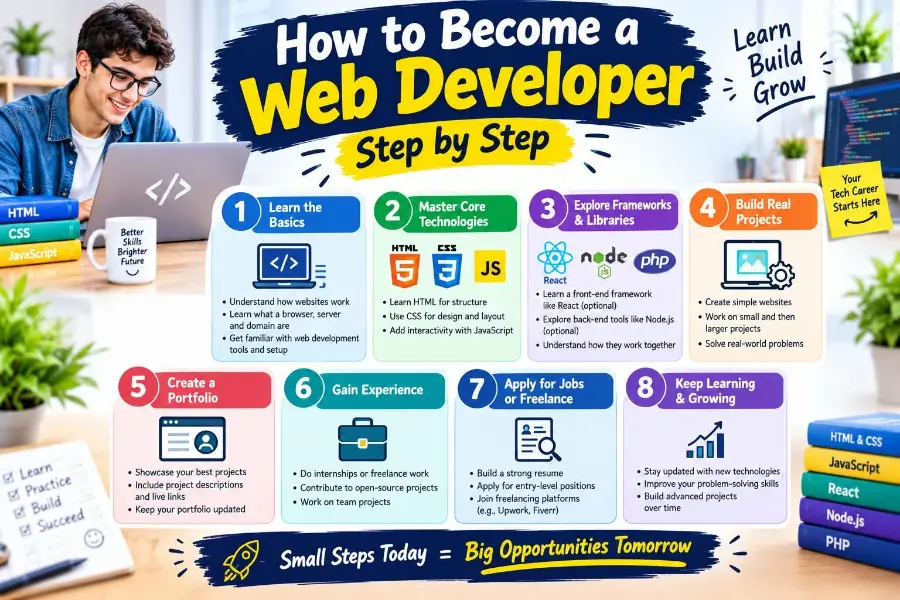
This guide explains how to become a web developer, which programming languages to learn, what tools to use, how to build a professional portfolio, and how to find your first job or freelance opportunity.
What Does a Web Developer Do?
A web developer builds, maintains, and improves websites and web applications. Their responsibilities include writing code, creating website layouts, developing interactive features, managing databases, and ensuring that websites work properly across different devices and browsers.
Web developers work with designers, project managers, content creators, and other technology professionals to turn ideas into functional digital products.
Their daily responsibilities may include:
- Writing and testing website code.
- Creating responsive website layouts.
- Developing interactive website features.
- Fixing technical errors and performance issues.
- Improving website speed and usability.
- Connecting websites to databases and external services.
- Maintaining website security and functionality.
- Updating existing websites with new features.
For example, when someone visits an online shopping website, a web developer helps ensure that visitors can browse products, create accounts, add items to shopping carts, and complete purchases successfully.

Different Types of Web Developers
Before learning how to become a web developer, it is important to understand the main specializations within this profession. Each type focuses on a different part of website development.
1. Front-End Developer
A front-end developer builds the parts of a website that visitors can see and interact with. This includes page layouts, navigation menus, buttons, images, forms, and other visual elements.
Front-end developers focus on creating attractive, accessible, and user-friendly website experiences.
Essential Front-End Technologies
- HTML: Provides the structure of web pages.
- CSS: Controls website appearance, colors, spacing, and layouts.
- JavaScript: Adds interactive features and dynamic behavior.
- React: Helps developers build reusable user interface components.
For example, when a visitor clicks a menu button or interacts with a website form, front-end code helps make that interaction possible.
2. Back-End Developer
A back-end developer works on the server-side functionality that powers websites and applications. Although visitors usually cannot see this part directly, it plays an important role in keeping websites running properly.
Back-end developers manage application logic, databases, authentication systems, and communication between servers and website interfaces.
Common Back-End Technologies
- Python
- PHP
- JavaScript with Node.js
- Java
- SQL
- PostgreSQL
- MySQL
For example, when a customer logs into an online account, the back-end system checks the submitted information and retrieves the appropriate account data.
3. Full-Stack Developer
A full-stack developer works with both front-end and back-end technologies. This means they can build the visible parts of a website while also developing the server-side systems that support its functionality.
Full-stack developers often work on complete web applications, including user interfaces, databases, authentication, and server communication.
Skills Required for Full-Stack Development
A full-stack developer generally needs knowledge of:
- HTML and CSS.
- JavaScript.
- Front-end frameworks.
- Server-side programming.
- Database management.
- APIs and web services.
- Version control systems.
This specialization suits developers who enjoy understanding how an entire website or application works.
How to Become a Web Developer Step by Step
Becoming a web developer requires technical knowledge, practical experience, and continuous learning. Instead of trying to learn every programming language at once, beginners should follow a structured learning path.
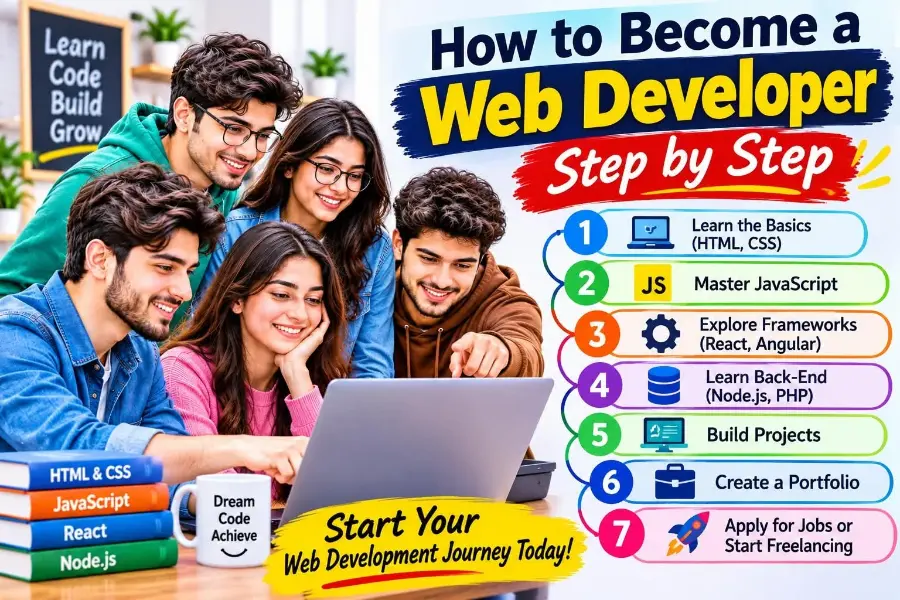
Here are ten practical steps to help you start your journey.
1. Understand the Basics of Web Development
Before writing your first line of code, take some time to understand how websites work.
A website is generally made up of several components that communicate with one another. When someone enters a website address into a browser, the browser requests information from a web server and displays the content it returns.
Understanding basic concepts will make learning programming languages much easier.
Important Concepts to Learn
- Websites and web applications: Understand how traditional websites differ from interactive applications.
- Web browsers: Learn how browsers display website content.
- Web servers: Understand how websites deliver information to visitors.
- Domains and hosting: Learn how websites become accessible online.
- HTTP and HTTPS: Understand how browsers and servers communicate.
- Responsive design: Learn how websites adjust to different screen sizes.
You do not need to become an expert in these concepts immediately. A basic understanding is enough to begin learning practical web development.
2. Learn HTML to Build Website Structure
HTML (HyperText Markup Language) is the foundation of web development. It defines the structure and content of web pages.
HTML allows developers to organize headings, paragraphs, images, links, tables, forms, and other website elements.
What Should You Learn in HTML?
Start by understanding:
- HTML document structure.
- Headings and paragraphs.
- Links and images.
- Lists and tables.
- Forms and input fields.
- Semantic HTML elements.
- Basic accessibility practices.
Practice Your HTML Skills
Create a simple personal webpage containing:
- Your name and introduction.
- A profile image.
- A short biography.
- Your education or experience.
- A list of interests.
- Links to your social profiles.
This small project will help you understand how HTML elements work together to create a complete webpage.
3. Master CSS to Design Attractive Websites
After learning HTML, the next step is understanding CSS (Cascading Style Sheets).
CSS controls the visual appearance of websites. It allows developers to customize colors, fonts, spacing, backgrounds, borders, and layouts.
Without CSS, most websites would appear as basic documents with very limited visual styling.
Important CSS Topics
Focus on learning:
- CSS selectors and properties.
- Colors and typography.
- Margins and padding.
- Borders and backgrounds.
- Flexbox.
- CSS Grid.
- Responsive layouts.
- Media queries.
- CSS transitions and animations.
Learn Responsive Web Design
Responsive web design is particularly important because people access websites through smartphones, tablets, laptops, and desktop computers.
A responsive website automatically adjusts its layout to provide a comfortable browsing experience on different screen sizes.
Practice by creating a webpage that looks good on both mobile and desktop devices.
4. Learn JavaScript for Interactive Websites
JavaScript is one of the most important programming languages for modern web development. It allows developers to make websites interactive and dynamic.
While HTML provides structure and CSS controls appearance, JavaScript adds functionality.
For example, JavaScript can help developers create:
- Interactive navigation menus.
- Image sliders.
- Form validation.
- Search features.
- Dynamic content updates.
- Shopping cart functionality.
- Interactive calculators.
JavaScript Concepts Beginners Should Learn
Start with the following topics:
- Variables and data types.
- Operators and expressions.
- Conditional statements.
- Loops.
- Functions.
- Arrays and objects.
- Document Object Model (DOM).
- Events and event handling.
- Promises and asynchronous programming.
- Fetch API and working with external data.
Practice with Small JavaScript Projects
Once you understand the basics, build simple applications such as a calculator, digital clock, to-do list, or interactive quiz.
These projects help transform theoretical knowledge into practical programming skills.
5. Choose a Web Development Specialization
After learning HTML, CSS, and JavaScript, consider which area of web development interests you most.
You don’t need to master every specialization right away. Choosing a direction helps you focus your learning efforts.
Front-End Development
Choose front-end development if you enjoy website design, visual details, layouts, and user interaction.
Popular technologies include:
- React.
- Vue.js.
- Angular.
- Bootstrap.
- Tailwind CSS.
Back-End Development
Choose back-end development if you enjoy programming logic, databases, server management, and application functionality.
Popular technologies include:
- Node.js.
- Python.
- PHP.
- Django.
- Laravel.
- Express.js.
Full-Stack Development
Choose full-stack development if you want to work on both the front end and back end of websites.
You can start with a combination like HTML, CSS, JavaScript, React, Node.js, and a database.
The best specialization matches your interests and long-term career goals.
6. Learn Popular Frameworks and Development Tools
After understanding the fundamentals, start exploring frameworks and tools that make development more organized and efficient.
A framework or library provides reusable features and structures that help developers build applications without writing everything from scratch.
Popular Front-End Frameworks and Libraries
React: A JavaScript library for building interactive user interfaces.
Angular: A comprehensive framework for developing structured web applications.
Vue.js: A progressive JavaScript framework that helps developers build user interfaces.
Bootstrap: A front-end toolkit that provides ready-made components and responsive design utilities.
Tailwind CSS: A utility-first CSS framework that helps developers style websites efficiently.
Important Development Tools
Visual Studio Code: A popular code editor for writing and managing programming files.
Git: A version control system that tracks changes in code.
GitHub: A platform where developers can store, manage, and share their code.
Chrome DevTools: A browser tool for inspecting webpages, debugging code, and testing website performance.
Learning these tools can improve your workflow and prepare you for professional development environments.
7. Understand Databases and Back-End Development
If you want to develop more advanced websites and applications, learning databases and back-end programming is an important next step.
A database stores information that websites need to operate, such as customer accounts, product details, orders, and user preferences.
Learn the Basics of Database Management
Start by understanding:
- What databases are.
- How data is stored.
- Tables, rows, and columns.
- Primary and foreign keys.
- Database relationships.
- Basic database queries.
- Data security and backups.
Popular Database Technologies
MySQL: A widely used relational database management system.
PostgreSQL: An advanced open-source relational database system.
MongoDB: A document-oriented NoSQL database.
SQLite: A lightweight database often used for smaller applications and development projects.
You should also learn how back-end applications communicate with databases through queries and APIs.
8. Build Real-World Web Development Projects
Learning programming languages is important, but practical experience is what helps demonstrate your abilities.
One of the most effective ways to improve your skills is by building websites and applications from scratch.
Start with small projects and gradually move toward more complex applications.
Beginner-Friendly Project Ideas
Personal Portfolio Website: Create a website introducing yourself, your skills, and your projects.
Landing Page: Build a professional landing page for a product, service, or business.
To-Do List Application: Create an application that allows users to add, edit, and remove tasks.
Weather Application: Build an application that displays weather information using an API.
Blog Website: Develop a basic blog where visitors can browse articles and categories.
Intermediate Project Ideas
Once you are comfortable with basic development, try building:
- An e-commerce website.
- A user registration and login system.
- A restaurant website with an interactive menu.
- A task management application.
- A dynamic dashboard.
- A content management system.
Focus on Project Quality
When developing projects, pay attention to:
- Clean and readable code.
- Mobile responsiveness.
- Website loading speed.
- User-friendly navigation.
- Accessibility.
- Basic security practices.
- Proper error handling.
A few well-developed projects can demonstrate your abilities more effectively than dozens of unfinished tutorials.
9. Create a Professional Web Developer Portfolio
A professional portfolio is one of the most valuable tools for someone entering the web development industry.
It provides potential employers and clients with evidence of your technical abilities and practical experience.
Your portfolio should showcase your strongest projects and explain what you contributed to each one.
What Should Your Portfolio Include?
- A professional introduction.
- Your technical skills.
- Completed development projects.
- Screenshots of your work.
- Links to live websites.
- GitHub repositories.
- Contact information.
- A downloadable resume.
Make Your Portfolio Easy to Navigate
Use a clean layout, readable typography, and simple navigation. Ensure that visitors can quickly understand your skills and explore your work.
You can also include short project descriptions explaining the technologies you used and the problems your projects solve.
Remember, your portfolio doesn’t need to be complicated. A simple, professional website with strong projects is an excellent starting point.
10. Apply for Web Development Jobs or Start Freelancing
Once you have built practical skills and created a portfolio, you can start looking for professional opportunities.
You do not need to wait until you know everything about web development. Continue improving your skills while exploring entry-level opportunities.
Where to Find Web Development Jobs
Look for opportunities through:
- LinkedIn.
- Indeed.
- Glassdoor.
- Company career websites.
- Local technology companies.
- Professional networking communities.
Search for positions such as:
- Junior Web Developer.
- Front-End Developer.
- Junior Back-End Developer.
- WordPress Developer.
- Junior Full-Stack Developer.
- Web Development Intern.
Consider Freelancing
Freelancing is another way to gain experience and earn income through web development.
Popular freelancing platforms include:
- Upwork.
- Fiverr.
- Freelancer.
You can offer services such as website creation, landing page development, website customization, responsive design, and website maintenance.
Tips for Getting Your First Client
- Create a professional freelancing profile.
- Showcase your strongest projects.
- Clearly explain the services you provide.
- Start with realistic projects that match your abilities.
- Communicate professionally with potential clients.
- Deliver work on time.
- Request feedback after completing projects.
Building trust and developing a strong reputation takes time, so focus on providing quality work rather than expecting immediate results.
Essential Skills Every Web Developer Needs
Technical knowledge is only one part of becoming a successful web developer. Professionals also need communication, problem-solving, and organizational skills.
Here are some important abilities to develop.
1. Problem-Solving Skills
Web development involves identifying problems, understanding their causes, and finding effective solutions.
Developers regularly encounter coding errors, unexpected behavior, and technical challenges. Strong problem-solving skills help them handle these situations.
2. Attention to Detail
Small coding mistakes can affect website functionality and appearance. Paying attention to detail helps developers build reliable, professional websites.
3. Communication Skills
Web developers often work with clients, designers, managers, and other developers. Clear communication helps everyone understand project requirements and expectations.
4. Time Management
Managing development tasks, meeting deadlines, and organizing projects are important professional responsibilities.
5. Continuous Learning
Web technologies change frequently. Developers need to stay informed about new tools, frameworks, security practices, and development standards.
6. Creativity
Creativity helps developers find better ways to organize information, improve user experiences, and build attractive digital products.
Best Resources to Learn Web Development
Beginners do not always need expensive courses or professional training programs to start learning web development. Many reputable platforms offer free educational resources.
Here are some useful options.
1. MDN Web Docs
MDN Web Docs provides detailed educational materials about HTML, CSS, JavaScript, and modern web technologies.
It is particularly useful for understanding web development concepts and finding reliable technical documentation.
Website: https://developer.mozilla.org/
2. freeCodeCamp
freeCodeCamp offers free programming lessons, coding exercises, and practical projects.
It is a helpful learning platform for beginners who want structured practice.
Website: https://www.freecodecamp.org/
3. W3Schools
W3Schools provides beginner-friendly tutorials on HTML, CSS, JavaScript, SQL, and other technologies.
Website: https://www.w3schools.com/
4. The Odin Project
The Odin Project provides a structured curriculum focused on practical web development skills and project-based learning.
Website: https://www.theodinproject.com/
5. YouTube
YouTube contains thousands of web development tutorials covering programming languages, frameworks, tools, and practical projects.
Look for instructors who explain concepts clearly and encourage hands-on practice instead of simply copying code.
6. roadmap.sh
roadmap.sh provides visual learning roadmaps for different technology careers, including front-end, back-end, and full-stack development.
Website: https://roadmap.sh/
Do You Need a College Degree to Become a Web Developer?
A college degree can provide a useful foundation in computer science, programming, mathematics, and software engineering. However, a traditional degree is not always required to enter the web development profession.
Many employers also consider practical skills, technical knowledge, professional experience, and completed projects when evaluating candidates.
A self-taught developer can build a competitive foundation by learning programming languages, completing projects, contributing to open-source software, and developing a professional portfolio.
However, requirements vary by employer and role. Some companies prefer or require formal qualifications, while others place greater emphasis on demonstrated technical abilities.
If you don’t have a computer science degree, focus on building strong practical skills and presenting your work professionally.
How Long Does It Take to Become a Web Developer?
The time it takes to become a web developer depends on your learning schedule, prior experience, chosen specialization, and the complexity of the skills you want to develop.
Some beginners may understand basic website development within a few months, while becoming comfortable with professional projects can take considerably longer.
Here is an example of a learning timeline for someone studying consistently.
| Learning Stage | Estimated Time |
|---|---|
| HTML fundamentals | 2–3 weeks |
| CSS and responsive design | 3–5 weeks |
| JavaScript fundamentals | 6–10 weeks |
| Frameworks and development tools | 4–8 weeks |
| Back-end and database basics | 4–8 weeks |
| Portfolio and practical projects | 4–8 weeks |
These are approximate learning periods, not guaranteed milestones. Some learners progress faster, while others need additional time to understand programming concepts.
Suggested Six-Month Learning Roadmap
Month 1: Learn HTML and CSS
Understand website structure, styling, layouts, and responsive design. Build simple webpages to practice what you’ve learned.
Month 2: Learn JavaScript
Study programming fundamentals, functions, arrays, objects, events, and DOM manipulation.
Month 3: Build Small Projects
Create a calculator, to-do list, interactive landing page, and other beginner-friendly applications.
Month 4: Learn Frameworks and Tools
Explore React or another suitable front-end framework. Learn Git, GitHub, and browser developer tools.
Month 5: Explore Back-End Development
Understand servers, databases, APIs, and basic back-end programming.
Month 6: Build Your Portfolio
Complete two or three polished projects, publish your work online, improve your resume, and start applying for suitable opportunities.
This roadmap provides a starting structure. You may need more than six months before you are ready for a particular professional role.
Career Opportunities for Web Developers
Web development offers several career paths across different industries. Developers can work for technology companies, digital agencies, startups, educational institutions, financial organizations, and businesses with online operations.
1. Front-End Developer
Front-end developers focus on website interfaces, responsive layouts, and interactive user experiences.
2. Back-End Developer
Back-end developers build the server-side systems, databases, and application logic that support websites.
3. Full-Stack Developer
Full-stack developers work across front-end and back-end technologies and may contribute to complete web applications.
4. WordPress Developer
WordPress developers create, customize, and maintain websites using WordPress themes, plugins, and related technologies.
5. Freelance Web Developer
Freelance developers work independently and provide website development services to businesses, individuals, and organizations.
6. Web Application Developer
Web application developers create interactive online software, including dashboards, management systems, and business applications.
7. Software Development Career Paths
With additional experience and education, web developers may move into broader software engineering, technical leadership, or application architecture roles.
Common Mistakes Beginners Should Avoid
Learning web development can be challenging, especially when beginners try to learn too many technologies simultaneously.
Avoiding common mistakes can make your learning journey more productive.
1. Learning Too Many Programming Languages at Once
Trying to learn multiple languages and frameworks at once can cause confusion.
Start with HTML, CSS, and JavaScript before exploring additional technologies.
2. Watching Tutorials Without Practicing
Watching educational videos is useful, but passive learning doesn’t build strong programming skills.
Write code regularly and build your own projects to understand how different concepts work.
3. Ignoring the Fundamentals
Some beginners jump straight to advanced frameworks without fully understanding HTML, CSS, and JavaScript.
Strong fundamentals make advanced development easier to understand.
4. Avoiding Difficult Coding Problems
Encountering errors is a normal part of programming. Instead of immediately copying solutions, try to understand the cause of each problem.
Debugging is an important skill for professional developers.
5. Not Building a Portfolio
Completing courses and collecting certificates isn’t enough to demonstrate practical skills.
Create projects that show employers and clients what you can actually build.
6. Giving Up Too Early
Programming requires patience and consistent practice. Some concepts may take several attempts to understand.
Set realistic goals and focus on gradual improvement.
The Future of Web Development
Web development continues to evolve as businesses adopt new digital technologies and users expect faster, more accessible, and more interactive online experiences.
Several developments are influencing the future of this profession.
1. Artificial Intelligence in Web Development
Artificial intelligence tools are helping developers write code, identify errors, generate ideas, and automate certain development tasks.
However, developers still need to understand programming fundamentals, evaluate AI-generated code, and ensure that applications work correctly.
2. Progressive Web Applications
Progressive Web Apps combine features of websites and mobile applications. They can provide offline access, installability, and improved engagement on supported devices.
3. Increased Focus on Website Security
As websites handle more personal and business information, security remains an important priority.
Developers need to understand secure authentication, data protection, input validation, and common web vulnerabilities.
4. Responsive and Accessible Websites
Mobile browsing and digital accessibility continue to influence website design and development.
Developers must create experiences that work across devices and remain usable for people with different abilities.
5. Growing Importance of Web Performance
Website speed and performance influence user experience and can affect how visitors interact with online services.
Developers increasingly focus on efficient code, optimized images, reliable hosting, and faster loading.
Overall, the future of web development will likely involve greater automation, new technologies, and increasing expectations for digital experiences. Developers who continue learning and adapting will be better prepared for these changes.
FAQs
Here are answers to some common questions about becoming a web developer, learning essential programming languages, and starting a career in web development.
Yes, you can become a web developer without a college degree. Many professionals enter this field through self-study, online courses, and practical experience.
To get started:
- Learn HTML, CSS, and JavaScript.
- Complete practical web development projects.
- Build a professional portfolio.
- Develop problem-solving skills.
- Apply for internships and entry-level positions.
Practical skills and a strong portfolio can help demonstrate your abilities to potential employers.
Beginners should start with three essential web technologies:
- HTML: Builds the structure of web pages.
- CSS: Controls website design, colors, and layouts.
- JavaScript: Adds interactive features and functionality.
After learning these fundamentals, you can explore frameworks such as React and back-end technologies such as Node.js.
Mastering these core technologies provides a strong foundation for web development.
The learning timeline depends on your experience, study schedule, and chosen specialization.
A general learning roadmap includes:
- 1–2 months: Learn HTML and CSS.
- 2–3 months: Develop JavaScript skills.
- 3–4 months: Practice frameworks and development tools.
- 4–6 months: Build projects and develop a portfolio.
- 6 months or more: Prepare for professional opportunities.
These are approximate timelines, not guaranteed deadlines.
Consistent practice and real-world projects are more important than rushing through lessons.
Yes, several online platforms provide free web development tutorials, coding exercises, and learning resources.
Some useful options include:
- MDN Web Docs: Technical documentation and learning guides.
- freeCodeCamp: Free programming lessons and practical projects.
- W3Schools: Beginner-friendly web development tutorials.
- The Odin Project: Structured web development courses.
- YouTube: Video tutorials and practical coding demonstrations.
These resources can help beginners build essential programming skills without paying for expensive courses.
A successful web developer needs both technical and professional skills.
Important skills include:
- HTML, CSS, and JavaScript.
- Responsive web design.
- Front-end or back-end development.
- Database management.
- Git and GitHub.
- Problem-solving and debugging.
- Communication and time management.
Developing these skills can help you build professional websites and prepare for career opportunities.
Yes, you can work as a freelance web developer after developing the necessary technical skills and creating a portfolio.
You can offer services such as:
- Website design and development.
- WordPress website customization.
- Landing page creation.
- Responsive website development.
- Website maintenance and updates.
Popular freelancing platforms include Upwork, Fiverr, and Freelancer.
Start with smaller projects, deliver quality work, and gradually build your professional reputation.
Front-end and back-end development are two important areas of web development.
- Front-end development: Focuses on the visible parts of a website, including layouts, buttons, menus, and interactive features.
- Back-end development: Handles server-side functionality, databases, authentication, and application logic.
- Full-stack development: Combines front-end and back-end development.
Your choice should depend on your interests and the type of projects you want to build.
Web development can be a valuable career choice for people interested in technology, creativity, and problem-solving.
Potential opportunities include:
- Front-end developer.
- Back-end developer.
- Full-stack developer.
- WordPress developer.
- Freelance web developer.
- Web application developer.
However, career opportunities depend on your skills, experience, location, and employer requirements.
Learning web development becomes easier when you follow the right steps, practice regularly, and build real-world projects. Focus on developing your skills and gaining practical experience to start your web development career.
Final Thoughts
Learning how to become a web developer is a journey that requires patience, dedication, and consistent practice. You do not need to master every programming language or understand every technology before getting started. The most effective approach is to build a strong foundation, learn essential tools, and gradually develop your practical skills.
Begin with HTML, CSS, and JavaScript. Explore a specialization that matches your interests, complete real-world projects, and create a professional portfolio that demonstrates your abilities. As your confidence grows, start exploring internships, entry-level positions, and freelance opportunities.
Most importantly, remember that becoming a successful web developer is not just about learning to write code. It is about understanding problems, creating useful solutions, and continuously improving your knowledge as technology evolves.
Start with one small project today, keep practicing, and take consistent steps toward building a rewarding career in web development.
You May Also Like
If you are interested in web development and technology careers, these related guides may also help you explore other career opportunities:
- How to Become a Software Developer – Learn about programming languages, technical skills, education, and the steps to build a career in software development.
- How to Become a Computer Programmer – Discover the programming skills, coding languages, education, and experience needed to become a computer programmer.
- How to Become a UX/UI Designer – Explore user experience and interface design, essential design tools, and the skills needed to create user-friendly websites and applications.
Explore these guides to learn about different technology careers and find the path that matches your interests and abilities.


- Be Respectful
- Stay Relevant
- Stay Positive
- True Feedback
- Encourage Discussion
- Avoid Spamming
- No Fake News
- Don't Copy-Paste
- No Personal Attacks
- Be Respectful
- Stay Relevant
- Stay Positive
- True Feedback
- Encourage Discussion
- Avoid Spamming
- No Fake News
- Don't Copy-Paste
- No Personal Attacks
