How to Become a UX/UI Designer: Education, Skills, and Career Guide
Published: 14 Nov 2026
Technology has changed the way people shop, communicate, study, work, and access information. Almost every business needs a website, mobile app, or digital platform to connect with its customers. However, creating a digital product isn’t just about making it look attractive. It must also be easy to use, understandable, and enjoyable.
This is where UX/UI designers play an important role. They help businesses create digital experiences that look professional and allow people to complete tasks without confusion. From designing a shopping app to improving a banking website, UX/UI designers work on products that people use every day.
If you enjoy creativity, technology, problem-solving, and understanding people’s needs, this career may be worth exploring. The good news is that you do not always need a university degree to enter this field. With the right skills, practical experience, and a strong portfolio, you can work toward becoming a professional designer.

In this guide, you will learn how to become a UX/UI designer, what education and skills you need, which tools to learn, how to build a portfolio, and what career opportunities are available.
What Is a UX/UI Designer?
A UX/UI designer is a professional who helps create digital products that are both useful and visually appealing. These products may include websites, mobile applications, software, online stores, and other digital platforms.
UX stands for User Experience, while UI stands for User Interface. Both areas are connected, but they focus on different parts of the design process.
A UX/UI designer may research user needs, organize information, create page layouts, design buttons and menus, and test whether a product is easy to use.
In some companies, one designer handles both UX and UI responsibilities. In larger organizations, separate UX designers and UI designers may work together as part of a product team.
What Is UX Design?
User Experience (UX) design focuses on how people interact with a product and how easily they can achieve their goals.
For example, imagine someone using a shopping app. They want to search for a product, compare prices, add an item to their cart, and complete a purchase. A good UX design makes these steps simple and clear.
UX designers study users, understand their problems, organize information, and plan how a digital product should work.
Common UX design activities include:
- Conducting user research and interviews.
- Understanding users’ needs and problems.
- Creating user personas and user journeys.
- Planning website and app structures.
- Developing wireframes and prototypes.
- Testing designs with real users.
- Improving products based on feedback.
The main goal of UX design is to make digital products useful, accessible, and easy to navigate.
What Is UI Design?
User Interface (UI) design focuses on the visual and interactive elements that people see and use when interacting with a digital product.
For example, the colors, fonts, buttons, icons, images, menus, and layouts of a mobile app are all parts of its user interface.
UI designers make sure these elements look professional and work together consistently.
Common UI design responsibilities include:
- Choosing suitable colors and fonts.
- Designing buttons, icons, and menus.
- Creating website and app layouts.
- Maintaining consistent visual styles.
- Designing responsive interfaces for different screen sizes.
- Preparing visual designs for developers.
The main goal of UI design is to create an interface that is attractive, clear, and easy to interact with.
What Is the Difference Between UX and UI Design?
UX and UI design work together, but they are not the same.
| UX Design | UI Design |
|---|---|
| Focuses on the overall user experience | Focuses on the visual interface |
| Studies user needs and problems | Designs visual elements |
| Plans user journeys and navigation | Designs buttons, menus, colors, and fonts |
| Creates wireframes and prototypes | Creates polished interface designs |
| Tests usability | Maintains visual consistency |
For example, when designing a food delivery app, the UX designer plans how customers search for restaurants, select meals, and place orders. The UI designer decides how the restaurant cards, buttons, images, and order screens should look.
Both roles are important because a product should not only look good but also work well.
What Does a UX/UI Designer Do?
A UX/UI designer’s daily responsibilities depend on the company, project, and job title. Some designers focus more on research and usability, while others spend more time creating visual layouts and prototypes.
However, most UX/UI designers perform several common tasks.
Understanding User Needs
Designers need to understand the people who will use a product. They may conduct interviews, surveys, or research to discover users’ goals, expectations, and difficulties.
This information helps them make design decisions based on real problems rather than personal opinions.
Creating Wireframes and Prototypes
A wireframe is a basic layout that shows where different elements will appear on a screen. It helps designers plan the structure before adding detailed visuals.
A prototype is an interactive version of a design that allows people to experience how the product may work.
These tools help teams review ideas and identify problems before development begins.
Designing User Interfaces
UX/UI designers create the visual parts of websites and applications. They choose colors, typography, spacing, icons, images, and other interface elements.
They also ensure the design looks consistent across different pages and devices.
Testing and Improving Designs
Designers often test their work with users or team members. They observe how people interact with a design and identify areas that may cause confusion.
After collecting feedback, they make changes to improve the experience.
Working With Other Professionals
UX/UI designers regularly communicate with developers, product managers, researchers, marketers, and other designers.
They explain their design decisions, share prototypes, discuss project requirements, and help developers understand how the final product should look and behave.
Educational Requirements for UX/UI Designers
One of the most common questions beginners ask is whether they need a university degree to become a UX/UI designer.
The answer is no; a specific university degree is not always required. Many people enter the field through online courses, self-study, practical projects, and professional training.
However, formal education can provide useful knowledge and may help when applying for certain positions.
Do You Need a Degree to Become a UX/UI Designer?
A degree can be helpful, but it is not the only way to enter this profession.
Some employers prefer candidates with a bachelor’s degree in a related subject. Others focus more on practical skills, design knowledge, problem-solving ability, and portfolio quality.
If you do not have a degree, you can still work toward becoming a UX/UI designer by:
- Learning UX and UI design principles.
- Practicing with professional design tools.
- Completing online courses.
- Creating real-world design projects.
- Building a professional portfolio.
- Applying for internships and entry-level opportunities.
Your portfolio is especially important because it allows employers to see what you can actually do.
Which Degrees Are Useful for UX/UI Design?
If you plan to attend university, several subjects can provide a useful foundation.
Graphic Design: Helps you understand colors, typography, layouts, and visual communication.
Computer Science: Provides knowledge of technology, software, programming, and how digital products are developed.
Human-Computer Interaction (HCI): Focuses on how people interact with computers, websites, applications, and other digital systems.
Psychology: Helps you understand human behavior, decision-making, and how people respond to different experiences.
Web Design and Multimedia: Provides knowledge of digital layouts, visual design, websites, and interactive content.
You do not need to study all these subjects. Choose an educational path that matches your interests and career goals.
Can You Become a UX/UI Designer Without Experience?
Yes. Every professional starts somewhere, and you can begin learning without previous work experience.
Start with basic design concepts, practice using free or accessible tools, and create sample projects. You can redesign a simple website, develop a mobile app concept, or improve the navigation of an existing digital product.
These projects can become the starting point of your portfolio and help you demonstrate your abilities to potential employers.
Essential Skills You Need to Become a UX/UI Designer
A successful UX/UI designer needs a combination of technical skills, creativity, communication, and problem-solving.
You don’t have to master everything right away. Start with the fundamentals and improve your abilities through regular practice.
Technical Skills
Technical skills help you plan, create, test, and improve digital experiences.
User Research
User research helps designers understand the needs, expectations, and problems of their target audience.
You should learn how to conduct interviews, create surveys, study user behavior, and identify common problems.
Wireframing and Prototyping
Wireframing helps you plan the structure of a website or app. Prototyping lets you create interactive designs that show how users will move between screens.
These skills are important because they help teams test ideas before spending time and money on development.
Visual Design
You should understand basic visual design principles, including:
- Color theory.
- Typography.
- Spacing and alignment.
- Visual hierarchy.
- Contrast.
- Balance and consistency.
These principles help you create interfaces that look organized and professional.
Information Architecture
Information architecture is the process of organizing content and features so users can find what they need.
For example, an online store should organize products into clear categories and provide useful search and filtering options.
Interaction Design
Interaction design focuses on how users interact with buttons, menus, forms, navigation, and other interface elements.
You should understand how to create clear actions and provide helpful feedback when users interact with a product.
Responsive Design
A website or app should work properly on different screen sizes.
Learn how to design interfaces for mobile phones, tablets, laptops, and desktop computers. This skill is important because users access digital products through many types of devices.
Accessibility and Usability
Accessibility means making digital products usable by people with different abilities. Usability means making products easy to understand and operate.
Learn about readable text, suitable color contrast, keyboard navigation, clear labels, and accessible interface elements.
Basic HTML and CSS
UX/UI designers do not always need to write code. However, learning basic HTML and CSS can help you understand how websites are structured and how designs are translated into working pages.
It can also improve communication between designers and developers.
Soft Skills
Technical knowledge is important, but soft skills also help designers succeed.
Some valuable soft skills include:
- Communication: Explaining design ideas clearly to team members and clients.
- Creativity: Developing useful and original design solutions.
- Problem-solving: Finding practical ways to improve user experiences.
- Empathy: Understanding users’ needs, difficulties, and expectations.
- Teamwork: Working with developers, managers, researchers, and other designers.
- Time management: Completing projects within deadlines.
- Adaptability: Learning new tools and adjusting to changing project requirements.
Strong soft skills can help you become a more effective designer and build better professional relationships.
Best UX/UI Design Tools to Learn
Professional designers use different software tools to research users, create layouts, build prototypes, and share their work with teams.
You do not need to learn every available tool. Start with one main design platform and gradually explore others.
Figma
Figma is one of the most useful tools for beginners and professional UX/UI designers. It allows you to create website layouts, mobile app interfaces, wireframes, and interactive prototypes.
It also supports collaboration, which means multiple team members can review and work on designs.
If you are starting your UX/UI design journey, Figma is a practical first tool to learn.
Adobe Photoshop
Adobe Photoshop is commonly used for image editing, photo manipulation, and visual content creation.
Although it is not a complete UX/UI design solution, it can help when you need to prepare images or create visual assets for a project.
Adobe Illustrator
Adobe Illustrator is useful for creating vector graphics, icons, illustrations, and logos.
Learning its basic features can help you develop visual assets for digital interfaces.
Sketch
Sketch is a digital design tool used for creating user interfaces and prototypes. It is particularly associated with the Apple design ecosystem.
It can be useful if you work with teams that use Sketch in their design process.
Miro and FigJam
Miro and FigJam are collaborative whiteboarding tools. Designers use them to organize ideas, create user journey maps, plan workflows, and conduct brainstorming sessions.
They are especially helpful during the early stages of a project.
Which UX/UI Tool Should You Learn First?
For most beginners, Figma is a good place to start because it supports many common UX/UI design activities in one platform.
Once you understand its basics, you can explore Photoshop, Illustrator, Miro, and other tools based on your career goals.
Remember that learning software is only one part of becoming a designer. You also need to understand users, solve problems, and create meaningful experiences.
How to Become a UX/UI Designer: Step-by-Step Guide
If you are starting from zero, following a clear learning plan can make the process easier. The following steps can help you build the knowledge and practical skills you need to enter the field.
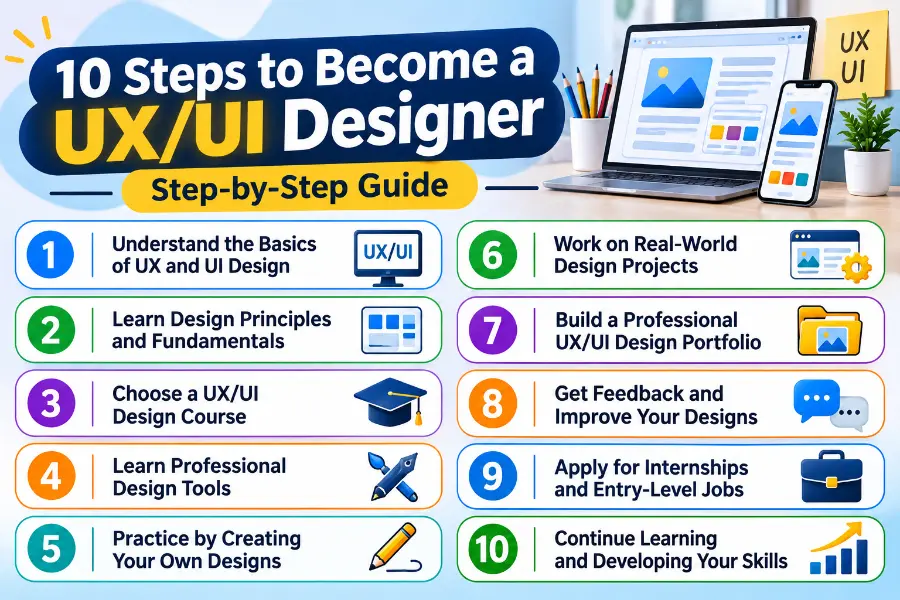
Here are 10 steps to start:
Step 1: Understand the Basics of UX and UI Design
Start by learning what UX and UI design mean and how they work together.
Understand the difference between user experience and user interface design. Explore how websites and mobile applications are structured and how users interact with them.
You should also learn basic concepts such as usability, accessibility, visual hierarchy, user research, and interaction design.
Do not rush through this stage. A strong understanding of the fundamentals will make advanced topics easier to learn.
Step 2: Learn Basic Design Principles
Before designing professional interfaces, understand how visual elements work together.
Study color combinations, typography, spacing, alignment, contrast, and consistency.
Look at popular websites and applications and observe how they organize their content. Ask yourself why certain buttons are placed in specific locations or why some pages are easier to navigate than others.
Try recreating simple layouts to practice what you learn.
Step 3: Choose a UX/UI Design Course
A structured course can help you learn important topics in the correct order.
You can choose a free course, a paid program, or a professional certificate. Look for courses that cover user research, wireframing, prototyping, usability testing, and portfolio development.
Avoid choosing a course only because it promises a quick job. Focus on the quality of its lessons and the practical projects it provides.
Step 4: Learn Figma and Other Essential Tools
Once you understand the basics, begin practicing with Figma.
Learn how to create frames, add text, use shapes, organize layers, build components, and create reusable design elements.
After that, practice creating wireframes and interactive prototypes.
You can explore additional tools such as Photoshop, Illustrator, Miro, and FigJam as needed.
Step 5: Practice Designing Simple Interfaces
Don’t wait until you finish every course to practice.
Start with small projects such as:
- A simple login page.
- A personal portfolio website.
- A restaurant website homepage.
- A mobile weather application.
- An online shopping product page.
- A registration form.
These exercises help you apply design principles and become more comfortable with your tools.
Step 6: Work on Realistic Design Projects
After practicing simple layouts, move on to more complete projects.
For example, you could design a food delivery app that allows users to search for restaurants, view menus, add meals to a cart, and place orders.
Think about the entire user journey rather than designing individual screens without a clear purpose.
Understand the problem, plan a solution, create the design, and test whether the experience makes sense.
Step 7: Build a Professional Portfolio
A UX/UI design portfolio is one of the most important things you need when applying for jobs.
It should demonstrate your design abilities and explain how you approach problems.
Include a few strong projects rather than filling your portfolio with many unfinished designs.
For each project, explain:
- The problem you wanted to solve.
- The target audience.
- Your research and planning process.
- Your wireframes and prototypes.
- Your final design.
- The feedback or testing you completed.
- What you learned from the project.
Your portfolio should show not only what the final design looks like but also how you reached your design decisions.
Step 8: Get Feedback and Improve Your Work
Do not rely only on your own judgment.
Share your designs with other learners, experienced designers, or potential users. Ask whether the layout is understandable, navigation is clear, and whether any part of the design creates confusion.
Use their feedback to improve your work.
Learning to accept constructive criticism is an important part of professional design.
Step 9: Apply for Internships and Entry-Level Jobs
Once you have learned the basics and prepared a portfolio, start looking for opportunities.
Search for positions such as:
- Junior UX Designer.
- Junior UI Designer.
- UX/UI Design Intern.
- Associate Product Designer.
- Junior Web Designer.
- UX Research Assistant.
Read job descriptions carefully and compare their requirements with your current skills.
You may not meet every requirement at first. Focus on roles that match your abilities and continue improving your portfolio.
Step 10: Continue Learning and Developing Your Skills
UX/UI design is a changing field. New tools, technologies, user expectations, and design practices keep evolving.
Follow design communities, study professional products, explore new techniques, and learn from experienced designers.
Also, keep updating your portfolio as you complete better projects.
Consistent learning will help you improve your skills and become more competitive in the job market.
How to Build a Strong UX/UI Design Portfolio
A portfolio is more than a collection of attractive screens. It shows employers how you think, solve problems, and create useful digital experiences.
Even if you have never worked for a company, you can build a portfolio using personal projects and realistic design challenges.
Include Different Types of Projects
Try to include projects that demonstrate different design abilities.
For example:
- Website design: Show how you organize website pages and navigation.
- Mobile app design: Demonstrate how you create mobile-friendly interfaces.
- Dashboard design: Show how you organize information and data.
- E-commerce design: Demonstrate product browsing, filtering, and checkout experiences.
- UX case studies: Explain the research, decisions, and testing behind your designs.
Choose projects that allow you to explain your process clearly.
Create Detailed Case Studies
A case study explains how you approached a design problem and developed a solution.
A useful case study may include the following sections:
- Project overview.
- Problem statement.
- Target audience.
- User research.
- User journey or user flow.
- Wireframes.
- Prototype.
- Final interface.
- Testing and improvements.
- Lessons learned.
You don’t need to pretend a personal project was completed for a real company. Clearly identify practice projects as personal or concept work.
Where Can You Showcase Your Portfolio?
You can use several platforms to share your work:
- Behance: Useful for presenting visual projects and design case studies.
- Dribbble: A platform for sharing interface concepts and design work.
- Personal website: Gives you control over how employers view your projects.
- LinkedIn: Helps you share your work and connect with recruiters and professionals.
Start with one platform and add others as your portfolio grows.
How to Gain Practical Experience as a Beginner
Learning design concepts matters, but practical experience helps you apply them in real situations.
You do not need to wait for your first full-time job to gain experience.
Complete Personal Projects
Choose a problem and design a solution on your own.
For example, you could improve an online store’s checkout experience or create a mobile app concept for booking appointments.
Document your process and include the finished project in your portfolio.
Apply for Internships
Internships can provide valuable experience working with professional designers and development teams.
You may learn how projects are managed, how design feedback is handled, and how designers communicate with clients.
Try Freelance Projects
Freelancing can help you work with clients and understand real project requirements.
Start with small projects, such as designing a landing page, improving a website layout, or creating a simple mobile app interface.
Be realistic about your experience and agree on clear project requirements before starting.
Participate in Design Challenges
Design challenges give you opportunities to practice different types of interfaces.
You can find prompts that ask you to create a login screen, dashboard, shopping app, or website homepage.
Use these challenges to build creativity and speed, but make sure your portfolio also includes projects that show stronger problem-solving skills.
Volunteer Your Skills
You may also offer design support to a small business, nonprofit organization, or community project.
This can help you understand real users and work with people who have specific goals and requirements.
Best UX/UI Design Courses and Certifications
Online courses can provide a structured way to learn UX/UI design. Some programs also include practical assignments and portfolio projects.
Here are a few options worth exploring.
Google UX Design Professional Certificate
The Google UX Design Professional Certificate is a popular learning option for beginners.
Its curriculum covers important topics such as user research, wireframing, prototyping, usability testing, and design tools. The program also includes practical activities that help learners develop portfolio projects.
You can find current program information through Google Skills.
Interaction Design Foundation
The Interaction Design Foundation offers courses covering UX design, user research, interaction design, and related subjects.
It may be useful for learners who want to study specific UX topics in more detail.
Coursera
Coursera provides access to courses and professional certificates from universities and companies.
You can explore UX design programs, beginner lessons, and specialized topics according to your learning needs.
Udemy
Udemy offers many UX/UI design courses covering Figma, interface design, prototyping, and portfolio development.
Course quality can vary, so check the syllabus, instructor experience, recent reviews, and practical exercises before enrolling.
Are UX/UI Certifications Worth It?
A certificate can show you completed a learning program, but it does not automatically make you job-ready.
Employers may also want to see practical design skills, problem-solving ability, communication skills, and a strong portfolio.
Choose courses that help you create projects and understand the design process. Do not collect certificates without practicing what you learn.
Different Types of UX/UI Design Careers and Specializations
UX/UI design includes several career paths. Some professionals work across the entire design process, while others focus on a specific area.
Understanding these specializations can help you decide which direction interests you most.
UX Designer
A UX designer focuses on making digital products useful and easy to navigate.
They research users, plan user journeys, create wireframes, and test product experiences.
UI Designer
A UI designer focuses on the visual appearance of digital products.
They design buttons, icons, typography, colors, layouts, and other interface elements.
Product Designer
A product designer works on the overall experience of a digital product.
This role may combine UX design, UI design, product thinking, research, and collaboration with development teams.
UX Researcher
A UX researcher studies users and their behavior.
They conduct interviews, surveys, usability tests, and other research activities to help teams understand user needs.
Interaction Designer
An interaction designer focuses on how people interact with digital interfaces.
They plan how buttons, menus, forms, animations, and other elements should respond to user actions.
Visual Designer
A visual designer focuses on the appearance of digital products and other visual materials.
Their work may include typography, colors, illustrations, icons, and visual layouts.
UX Writer
A UX writer creates the words people see when using websites and applications.
They write button labels, error messages, instructions, notifications, and other interface content to make products easier to understand.
How Long Does It Take to Become a UX/UI Designer?
The time it takes to become a UX/UI designer depends on your learning speed, prior experience, available study time, and the type of job you want.
Some beginners may learn basic concepts within a few weeks, while becoming confident enough to apply for professional positions can take several months or longer.
As a general learning plan, you might spend:
- First month: Understanding UX/UI concepts and basic design principles.
- Second month: Learning Figma and practicing simple interfaces.
- Third month: Creating complete website and mobile app projects.
- Fourth month: Developing portfolio case studies and getting feedback.
- Following months: Improve your skills, gain experience, and apply for suitable jobs.
This is only an example, not a guaranteed timeline. Some people progress faster, while others need more time.
The most important thing is to practice consistently and focus on building useful skills rather than rushing to finish a course.
UX/UI Designer Salary and Earning Potential
UX/UI design can offer good earning opportunities, but salaries vary significantly depending on location, experience, specialization, company size, and employment type.
A beginner at a small local company may earn differently than an experienced product designer at an international technology company.
Entry-Level UX/UI Designer Salary
Entry-level designers generally earn less than experienced professionals because they are still developing their skills and professional experience.
Your starting salary may depend on your portfolio, practical knowledge, communication skills, and the position’s responsibilities.
Internships and junior roles can provide valuable experience while helping you build your career.
Experienced UX/UI Designer Salary
Designers with several years of experience may qualify for more advanced roles.
They may handle complex projects, lead design decisions, conduct research, mentor junior designers, or work closely with product teams.
Specialized skills and a strong record of successful projects can improve earning potential.
UX/UI Designer Salary in Different Countries
Salary levels differ across the United States, United Kingdom, Canada, Australia, Pakistan, India, and other countries.
For example, the U.S. Bureau of Labor Statistics reported a $104,000 median annual wage for web and digital interface designers in May 2025. This is a related occupational category, not a salary figure for every UX/UI designer, and it should not be treated as a guaranteed starting salary.
For other countries, compare salary estimates with current local job listings and reliable salary surveys, since pay can vary widely by city and employer.
Freelance and Remote Earning Opportunities
UX/UI designers can also work as freelancers or remote employees.
Freelancers may earn money by designing websites, mobile applications, landing pages, dashboards, and other digital products.
Remote work can provide access to clients and companies in different countries. However, international opportunities are competitive, and clients usually expect strong communication, reliable delivery, and a professional portfolio.
Career Opportunities and Job Outlook for UX/UI Designers
Businesses increasingly depend on websites, mobile applications, online services, and digital products. These products need to be useful, accessible, and easy to navigate.
This creates opportunities for professionals who understand user needs and can design effective digital experiences.
Where Can UX/UI Designers Work?
UX/UI designers can work in different industries and organizations, including:
- Technology and software companies.
- Digital marketing agencies.
- Banks and financial institutions.
- E-commerce businesses.
- Healthcare technology companies.
- Educational technology companies.
- Startups and small businesses.
- Government and public service organizations.
Some designers work full-time, while others work independently or freelance.
Can UX/UI Designers Work Remotely?
Yes. Many UX/UI design tasks can be completed remotely using design and collaboration tools.
Designers can create interfaces, share prototypes, attend online meetings, and receive feedback without working in the same office as their team.
However, remote opportunities depend on the employer, role, location requirements, and the designer’s experience.
What Is the Job Outlook?
The U.S. Bureau of Labor Statistics groups web and digital interface designers with related digital occupations. Its projections show that employment for web and digital interface designers is expected to grow by 6% from 2025 to 2035.
This is useful market context, but it is not a forecast for every UX/UI job or every country. Demand can vary by region, industry, and employer.
The growth of digital services creates opportunities, but beginners should also understand that employers look for practical skills and strong portfolios. Learning current design tools and developing problem-solving abilities can help you prepare for the market.
Is UX/UI Design a Good Career Choice?
UX/UI design can be a rewarding career for people who enjoy creativity, technology, and solving problems.
It offers opportunities to work on websites, applications, software, and digital services used worldwide.
However, it also requires continuous learning, attention to detail, and the ability to accept feedback.
Benefits of Becoming a UX/UI Designer
Some advantages of this career include:
- Creative work: You can turn ideas into useful digital experiences.
- Different career paths: You can specialize in UX, UI, product design, research, or interaction design.
- Remote opportunities: Some companies allow designers to work from home.
- Industry variety: You can work in technology, finance, healthcare, education, and other sectors.
- Freelance options: You can provide design services to clients.
- Continuous learning: You can develop new skills as technology changes.
Challenges of Becoming a UX/UI Designer
Like other professions, UX/UI design has challenges.
Strong competition: Many people are learning design, so beginners need to demonstrate their skills through practical projects.
Continuous learning: Design tools and industry practices change, so you need to keep learning.
Client and team feedback: You may need to revise your designs several times to meet project requirements.
Problem-solving pressure: You must balance user needs, business goals, technical limitations, and project deadlines.
Portfolio development: Creating strong case studies takes time and careful planning.
Understanding these challenges can help you decide whether this career matches your interests and working style.
Tips for Building a Successful Career as a UX/UI Designer
Learning design tools is only the beginning. To build a successful career, develop good work habits and keep improving your skills.
Here are some practical tips for beginners.
Focus on Solving Problems, Not Just Making Designs Look Attractive
A beautiful interface isn’t necessarily a useful one.
Always think about what users want to achieve and how your design can make the process easier.
Practice Regularly
Set aside time to practice design principles, create layouts, and explore different types of digital products.
Regular practice builds confidence and improves your design skills.
Study Existing Websites and Applications
Explore popular websites and mobile apps. Observe their navigation, colors, layouts, forms, and interactions.
Think about what works well and what could be improved.
Learn to Explain Your Design Decisions
Employers and clients may ask why you chose a particular layout, color, or navigation structure.
Explain your decisions using user needs, research, accessibility, and design principles rather than simply saying something looks better.
Keep Your Portfolio Updated
Remove weak or outdated projects as your skills improve. Add new work that demonstrates your current abilities.
A smaller portfolio with strong case studies can be more effective than a large collection of unfinished designs.
Improve Your Communication Skills
Designers regularly work with clients, developers, researchers, and managers.
Clear communication helps prevent misunderstandings and makes collaboration easier.
Stay Updated With Design Trends and Technology
Follow professional designers, read industry resources, and explore new tools.
You should also learn how AI tools can support design research and creative workflows while continuing to develop your judgment and problem-solving skills.
Explore a Related Creative Career
If you enjoy creating digital designs and working with colors, layouts, and visual elements, you may also be interested in graphic design. Graphic designers create logos, advertisements, social media graphics, and other visual content for businesses and brands. Explore our detailed guide on how to become a graphic designer to learn about the essential skills, design software, courses, portfolio development, and career opportunities in this creative field.
FAQs
Here are some common questions and their answers about becoming a UX/UI Designer.
Yes. A university degree is not always required to become a UX/UI designer. You can develop the necessary skills through different learning methods.
- Take online UX/UI design courses.
- Learn design principles through self-study.
- Practice using tools such as Figma.
- Create real-world projects and build a strong portfolio.
A good portfolio can help demonstrate your abilities to potential employers, even without a formal degree.
UX/UI design is manageable for beginners, but it requires time, patience, and regular practice.
- Learn basic design principles and visual hierarchy.
- Understand user behavior and research.
- Practice wireframing and prototyping.
- Improve your visual design and problem-solving skills.
With consistent practice, you can gradually develop the skills needed to become a UX/UI designer.
The time required depends on your learning speed, previous experience, and daily practice schedule.
- You may learn basic concepts within a few weeks.
- Developing practical design skills can take several months.
- Building a professional portfolio may take longer.
- Preparing for entry-level opportunities depends on your experience and progress.
Focus on developing practical skills rather than rushing to complete your learning journey.
Figma is a good first choice for most beginners because it provides useful features for creating digital interfaces and prototypes.
- Use Figma to create website and mobile app layouts.
- Practice making wireframes and interactive prototypes.
- Learn how to create reusable components.
- Explore Photoshop and Illustrator when you need additional design skills.
Start with Figma and gradually explore other tools as your experience grows.
Most UX/UI designers do not need advanced coding skills because their main responsibility is designing user experiences and interfaces.
- Learn basic HTML to understand website structure.
- Study CSS to understand how website layouts and styles work.
- Understand how designs are converted into working websites.
- Improve communication with developers.
Basic coding knowledge can make you a more effective designer, even if you do not become a programmer.
Yes. You can learn UX/UI design independently using online resources, tutorials, and practical exercises.
- Follow beginner-friendly online courses.
- Watch Figma tutorials and practice regularly.
- Complete personal design projects.
- Participate in design challenges.
- Ask experienced designers for feedback.
Self-study can effectively develop your skills if you stay consistent and keep practicing.
Yes. UX/UI design can be a good career choice for beginners who enjoy creativity, technology, and problem-solving.
- You can start without previous professional experience.
- You can learn through online courses and practical projects.
- You can build a portfolio using personal projects.
- You can apply for internships and junior positions.
Starting with the basics and improving your skills step by step can help you work toward a career in this field.
Yes. Many UX/UI designers can work remotely because most design activities can be completed using online tools.
- Create designs and prototypes from home.
- Collaborate with team members through online platforms.
- Attend virtual meetings and share project updates.
- Work with companies and clients in different locations.
However, remote work opportunities depend on the employer, job requirements, and your professional experience.
UX and UI designers have different responsibilities, but they work together to create effective digital products.
- UX Designer: Focuses on user needs, navigation, usability, and the overall experience.
- UI Designer: Focuses on visual elements such as buttons, colors, typography, icons, and layouts.
- Both: Help create digital products that are easy to use and visually appealing.
Understanding these differences can help you choose the specialization that matches your interests.
Getting your first UX/UI design job requires practical skills, a professional portfolio, and consistent effort.
- Learn UX/UI fundamentals and practice with Figma.
- Create several complete website and mobile app projects.
- Prepare detailed portfolio case studies.
- Share your work on platforms such as Behance and LinkedIn.
- Apply for internships and junior design positions.
- Explore freelance and volunteer opportunities.
Building practical experience and presenting your work professionally can improve your chances of finding your first opportunity.
If you plan to become a UX/UI designer, start with the fundamentals, practice regularly, and build your portfolio one project at a time. Each step will help you build the confidence and skills you need to move toward a successful career.
Conclusion
Becoming a UX/UI designer is a practical career option for people who enjoy creativity, technology, and solving problems. You don’t always need a university degree or professional experience to get started. What matters is developing the right skills and learning how to create digital products that meet users’ needs.
Start by understanding the difference between UX and UI design, learning basic design principles, and practicing with tools such as Figma. Then create realistic projects, build a strong portfolio, seek feedback, and look for internships or entry-level opportunities.
Remember that becoming a professional designer takes time. You may face challenges while learning new tools or developing your first portfolio, but consistent practice can help you improve.
If you stay curious, keep learning, and focus on solving real user problems, you can build the skills you need to pursue a successful career in UX/UI design.




- Be Respectful
- Stay Relevant
- Stay Positive
- True Feedback
- Encourage Discussion
- Avoid Spamming
- No Fake News
- Don't Copy-Paste
- No Personal Attacks
- Be Respectful
- Stay Relevant
- Stay Positive
- True Feedback
- Encourage Discussion
- Avoid Spamming
- No Fake News
- Don't Copy-Paste
- No Personal Attacks
